
On screen keyboard
3.8 Miscellaneous
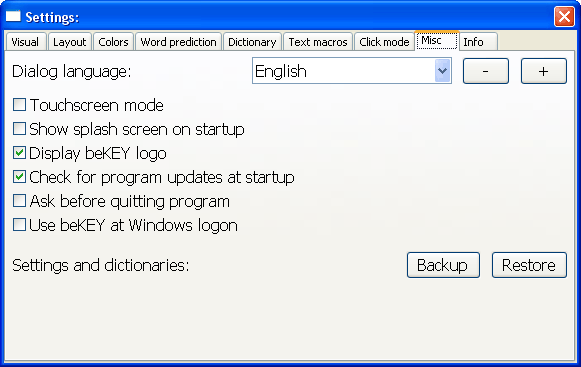
3.8.1 Dialog language
This will change the language used for dialogs and messages (but NOT the dictionary).
This is the only settings that requires beKEY to be restarted to have effect.
3.8.2 Touchscreen mode
If you select the "touchscreen mode" beKEY will behave differently in two aspects:
1) The logic when using the MOVE keys is reversed. (Look here.)
2) The keys won't be highlighted when the mouse cursor is above them. When using a touchscreen this would cause keys to remain highlighted,
even after the stylus or finger had been lifted off the screen.
3.8.3 Show splash screen on startup
This determines whether the beKEY splash screen should be displayed on startup. This option only has effect on registered versions of beKEY,
the demo and trial versions will always display the splash screen.
3.8.4 Display beKEY logo
This determines whether the beKEY Logo should be displayed on the main keyboard window. This option is only available on registered versions of beKEY,
the demo and trial versions will always display the logo.
3.8.5 Check for program updates at startup
If this option is checked, beKEY will connect our server on
startup and check if a new program version is available. If yes, a message will be displayed.
3.8.6 Ask before quitting programm
If this option is checked, the program will confirm quitting the program with a message box.
This is meant to avoid accidental closing of the application.
3.8.7 Use beKEY at Windows® logon
If this option is checked, beKEY will be started at the Windows® logon screen, so you can use it to enter your user name and password there.
This option is not available in Windows Vista®
3.8.8 Backup and Restore settings and dictionaries
Here you can backup and restore beKEY settings and dictionaries. This can be used to backup your personal settings or to transfer them to another computer. Both actions require beKEY to get restarted.
Especially when saving dictionaries this can take a few seconds while you don't see any activity on the screen, so please be patient.
A standard ZIP archive is used for this.
Windows® is a registered trademark of Microsoft Corporation in the U.S.A and other countries.
Windows Vista® is a registered trademark of Microsoft Corporation in the U.S.A and other countries.
© 2004-2009 M.Jürgens, www.be-enabled.de